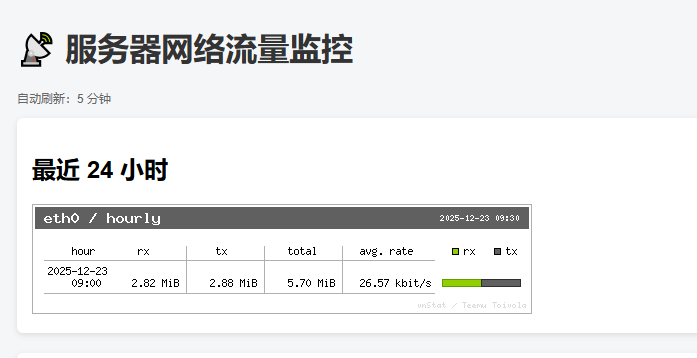
需要监控服务器的网卡流量,但不希望部署一整套很重的监控服务
希望整体和 goaccess 类似,但是 goaccess 是监控 web 服务的,这里使用 vnstat 来监控的是整台服务器的流量
# 安装vnstat
apt update
apt install vnstat
apt install vnstati

#指定需要监控的网卡
vnstat -i eth0

#重启vnstat
systemctl restart vnstat
新建一个 vnstat-html.sh 脚本,并对脚本添加授权,运行脚本就可以生成网卡的流量图,按需求可以生成小时、天、月的流量图
#!/bin/bash

IFACE="eth0"
OUT="/root/nginx/html/traffic"

vnstati -h -i $IFACE -o $OUT/hourly.png
vnstati -d -i $IFACE -o $OUT/daily.png
vnstati -m -i $IFACE -o $OUT/monthly.png
vnstati -t -i $IFACE -o $OUT/top.png
增加一个 crontab 定时任务,每隔 5 分钟执行一次该脚本 */5 * * * * /root/vnstat/vnstat-html.sh
在 nginx 的 root 目录下,增加一个 monitor.html 页面,整体代码如下
<!DOCTYPE html>
<html lang="zh-CN">
<head>
    <meta charset="UTF-8">
    <title>服务器流量监控</title>
    <meta http-equiv="refresh" content="300">
    <style>
        body {
            font-family: Arial, sans-serif;
            background: #f4f6f8;
            padding: 20px;
        }
        h1 {
            color: #333;
        }
        .chart {
            background: white;
            padding: 15px;
            margin-bottom: 20px;
            border-radius: 6px;
            box-shadow: 0 2px 6px rgba(0,0,0,.1);
        }
        img {
            max-width: 100%;
        }
        .time {
            color: #666;
            font-size: 12px;
        }
    </style>
</head>
<body>

<h1>📡 服务器网络流量监控</h1>
<p class="time">自动刷新:5 分钟</p>

<div class="chart">
    <h2>最近 24 小时</h2>
    <img src="traffic/hourly.png">
</div>

<div class="chart">
    <h2>最近 7 天</h2>
    <img src="traffic/daily.png">
</div>

<div class="chart">
    <h2>最近 12 个月</h2>
    <img src="traffic/monthly.png">
</div>

<div class="chart">
    <h2>流量最高的 10 天</h2>
    <img src="traffic/top.png">
</div>

</body>
</html>
初始运行一次脚本,然后通过浏览器访问 monitor.html 页面,显示下面的监控信息,界面略显粗糙